Pages

Showing posts with label Create. Show all posts

Sunday, September 16, 2018

Digital Fluency Week 8


What did I learn that increased my understanding of Manaiakalani kaupapa and pedagogy?

Empowerment gives people control or agency over their own lives.
As teachers we should first identify what disempowers the students and their whanau in our communities. 50% of those living in the Far North represent the 5th most deprived people in NZ. As educators we must consider the impact  of poverty on our students and what we can do to change this.   

Manaiakalani pedagogy aligns with the NZ Curriculum in the firm belief that students must be given opportunities to develop 'capabilities for growing, working and participating in their communities.' Students need to feel comfortable in the digital world because this the future. They can not be empowered unless they have agency/choice in their learning and are able to create their own digital footprint in a digital world - VISIBLITY They will not be empowered until they can learn globally, at anytime, anywhere - UBIQUITY. Student learning will not be visible or ubiquitous unless they are CONNECTED and are able to share and collaborate.
Manaiakalani pedagogy aims to empower students, their whanau and teachers through digital technology capability. Digital technology should NOT be understood as just a tool but instead as the means to empower our lives. Class sites and Blogs therefore need to be visible and accessible to whanau which will support families to be more connected to schools and to discuss and understand the learning of their children. 

How has the Manaiakalani kaupapa EMPOWERED you professionally with your teaching practice?

Today in the beautiful setting at the Waitangi Museum we had the opportunity to develop our understanding of  Hangarau Matihiko, the new Digital Technologies Curriculum which has two strands:
1. Computational Thinking for Digital Technologies
2. Designing and Developing Digital Outcomes

Monika and Kerry from the Raranga Matihiko programme gave us the wonderful opportunity to inquire into computational thinking and design by experimenting with a variety of amazing resources. 

I had fun discovering with Esther Dickenson as we created the following video using the 'Green Screen', and adding photos to the background. Our 'bloopers' were not arranging/inserting objects in the right order and that is why the whare, which should have been in the foreground, is imposed on the photo of trees and sky in the background. The outcome is still pretty cool.  What a great activity for using and developing the imagination and creativity. I would love to set up a 'Green Screen' booth or corner in the play room next year.

How has the Manaiakalani kaupapa EMPOWERED  you with new skills to use with your learners?  

Computational Thinking is a task broken down into little parts i.e. coding. Decomposition skills can be taught/practised without devices. This is coding 'unplugged' which I loved the idea of and can see this working really well in the junior classroom to develop computational skills, thinking and the key directional vocabulary in a collaborative and fun way. The coding app/programme 'SCRATCH' developed by Mitchel Resnick provides printable coding tiles to be used in this way. I will certainly take advantage of this. I've also ordered his book 'Lifelong Kindergarten - Cultivating Creativity' to help give some inspiration as I work towards establishing play-based learning at our school. Blending the 'Manaiakalani' and 'Learning through Play' pedagogies will be my focus.

How has the Manaiakalani kaupapa EMPOWERED  you personally?                    

My learning today has given me a clearer perspective of the Manaiakalani kaupapa and the necessity of preparing our students for the future. This pedagogy links to The Digital Technologies Curriculum perfectly.  Both have their roots in creativity and diversity, teaching and using the skills that will be required for productivity and input to better our communities and personal wellbeing and accomplishments.
Computational thinking can be applied to any activity [waiata ringa ringa; poi, rakau, tukutuku panels]. It is about applying rules, patterning and relationships, and can be intergrated into any classroom focus to make the learning authentic. Good pedagogy dictates that we do this anyway. It is the scaffolding that gives structure and embeds the learning.  . 

Wednesday, August 29, 2018

Digital Fluency Intensive Week 5

What did I learn that increased my understanding of Manaiakalani kaupapa and pedagogy?


Today's focus on Visible Learning hooked me in from the start. Visible teaching is empowering to students. When they can visibly see what their learning looks like for the week and where the learning is heading it provides them with support and gives them some ownership. The whole of the process should be visible - PLANNING which is embedded into your class site; PROCESS which are the learning tasks accessed and explained on the class site;  OUTCOMES - what students have learned/created/shared during the learning and how they went about this [method/collaboration];  ASSESSMENT using evidence of what students have done. 
There are no surprises for students and parents also have access to their child's personal learning blog and the class blog through a parent portal. 
Visible Teaching needs to be 'Accessible' - teachers are to make sure their sharing permissions are sorted so that it is 'Available' to their students. Visible Teaching has to be prepared in 'Advance.' 

Danni Stone from Pt England School shared insights into the benefits of 'Multi- Modal' learning. This is used as a hook to get students interested and keep them engaged both cognitively and behaviorally.
It is very important how teachers use the technology and how the learning is presented. Students need to be quickly engaged  [behavioural], then quickly move into the learning and then deeper learning. For example you can give students increasingly more complex text.The following video explains the effect of visible learning. Achievement data from Manaiakalani schools is collected by Woolf Fisher Researchers and analysed. 

Multi-Modal teaching/learning can be applied in blogs. This was compared to 'window dressing' in blogs and sites which has the aim of hooking viewers in to explore/inquire further. It can be used in the same way as a hook for teachers, parents and whanau.

Danni stressed that technology itself can be a hook when students first get to use devices. This wears off and it is the learning tasks themselves using a Multi-modal approach to engage, which strengthen learning and deepen understanding. 


What did I learn that will increase my confidence, capability or work flow as a professional?

I have not created a class site as yet, however we had the opportunity today to create a multi-modal gardening site for children. Click on the picture link to it. 
 Te Whare Tui Gardens with Science
I know that I will be able to add to this and use it in the future. The new Google Sites app is certainly more user friendly than the old Classic sites that I have used before and I am now more confident to attempt a class site as a portal to student learning.

What did I learn that I could use with my learners?

I saw how a class site can be used as the access to learning for students. At a click of a button they will be able to see what they have to do and how to do complete the task. I look forward to being able to manage my planning,  student/group activities,  formative assessment and collaborating with other teachers in my syndicate in this way. I am also looking forward to next weeks DFI when I'll learn how a class site links to Explain Everything on the iPad.

What did I learn that could improve my confidence, capability and workflow in my personal life?

Hopefully after the initial creation of my class site, learning how to use it effectively and teaching the students to use it in tandem with the ipads, my workflow will be improve. Having visible teaching and learning accessible to all stakeholders in one place is my goal.

Wednesday, August 8, 2018

Digital Fluency Intensive Week 3


What did I learn that increased my understanding of Manaiakalani kaupapa and pedagogy?


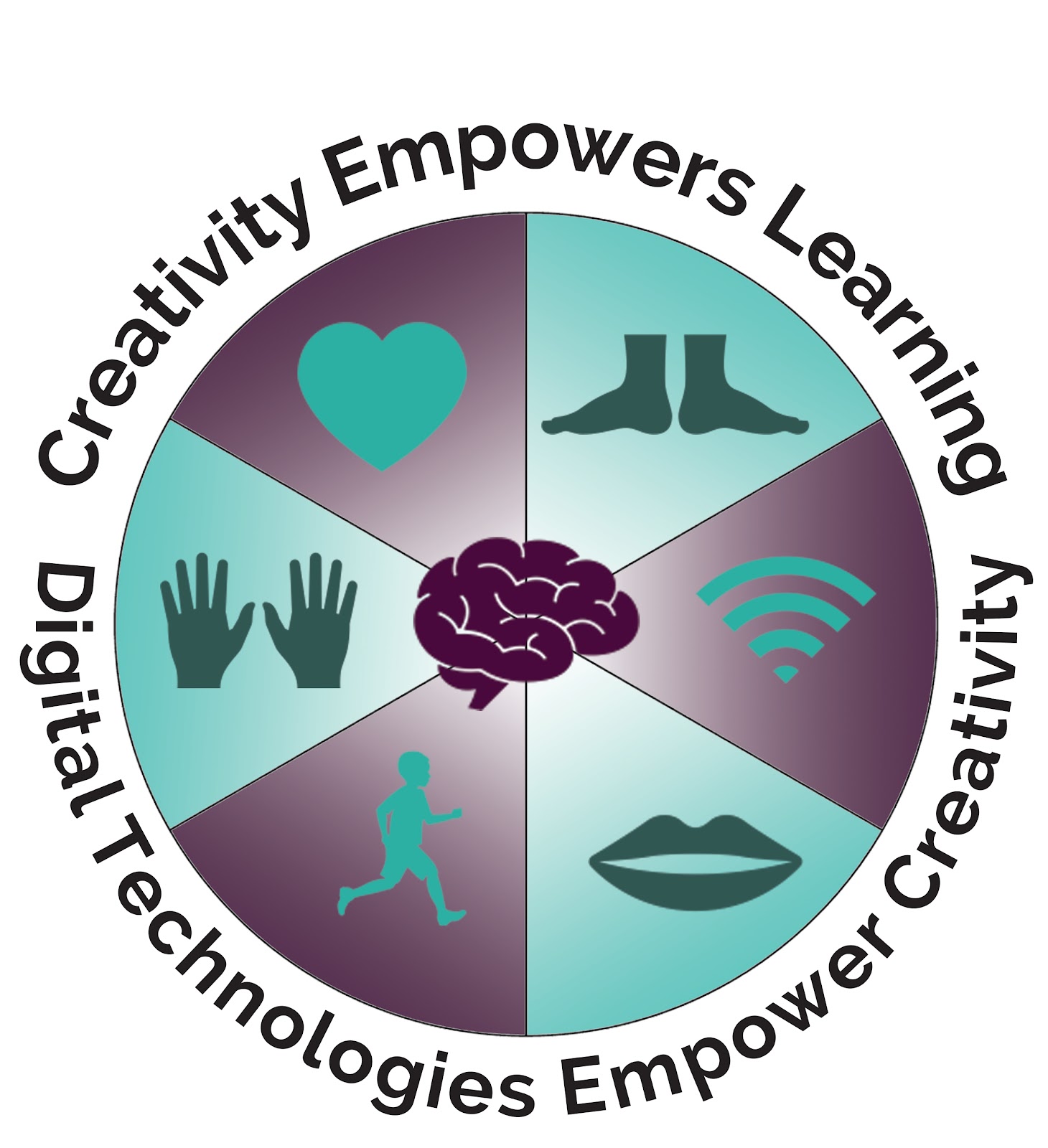
Creativity Empowers Learning: Teachers are creative when they design experiences that hook students into learning and also provide a opportunities for students to be creative in a variety of ways. The following graphic depicts the brain as being the center of thinking but most of us, and especially our students, need to use our bodies in creative ways to help our brains make sense of the world around us, ideas, concepts and new learning. Using our hands, feet, mouths, the whole body to sing, dance, create visual arts, construct, build, cook, act and speak makes us happy and empowers learning. Such activities provide opportunity for children to learn about themselves, what they like to do, where they come from and connect with the world around them. Digital technology empowers creativity but is only a small part of the whole. In fact devices may just be used to capture and share the other avenues of creativity.


What did I learn that will increase my confidence, capability or work flow as a professional?

1. I learned to make a button! A skill which I know will be used many times in the future for my class site and also in changing our School Curriculum site from Classic Sites to the New Google Sites.


2. I learned to change the settings in my You Tube account to make them private, and to stop embedded videos on class sites continuing on to suggested videos. I will now save my videos in You Tube rather than book marking them. This is a much better way to organise them.


3. I learned lots about the features of Google Slides as I created an animated story. I did actually get a bit carried away when completing it at home. Short animations could be used as motivation fro creative writing, or a fun way of explaining a strategy or concept in maths, science etc.


What did I learn that I could use with my learners?

1. I could definitely use animated Google Slides as mentioned above. 
2. Embedding rewindable videos into my class site when I have created one.
3.Creating labelled playlists in You Tube will help with collecting and organising video resources for future and repeated use in learning activities.
4. The use of buttons in Google sites and also on the iPads using 'Explain Everything' will provide access to student learning in the different curriculum areas. 

What did I learn that could improve my confidence, capability and workflow in my personal life?

1. Adjusting privacy settings with You Tube videos. This is especially applicable where grandchildren are concerned. 
2. I have never added a video of my family or class to You Tube and now thinking about the effects of negative comments on young people I am relieved I haven't. 

Thank you Dorothy, Kerry and Michael for all of the very helpful tips, information and hands-on, creative learning time you gave us. 

Friday, June 29, 2018

Term 2 Manaiakalani Staff Meeting


The emphasis was on CREATIVITY in the classroom. What creative experiences had we provided for our students this year? What had we as teachers created? Had we used technology to create? Creativity gives a real purpose for learning.

The image above reveals the different ways students are able to be creative: using vocals (singing, speaking etc), the whole body (dance, etc), hands, spiritual/wairua, feet, and with technology - which empowers the learning.

Creativity may be the process of learning, the hook into learning, and/or the end product.

I can see wonderful opportunities as I continue my digital learning journey through the Digital Fluency Intensive and for creating and sharing student learning using 'Explain Everything' with New Entrants during the next two terms. My personal journey into a blended digital classroom begins!  


"Creativity is now as important in education as literacy, and we need to treat it with the same status"