Pages

Showing posts with label STP4 Learning Focused Culture. Show all posts

Tuesday, June 29, 2021

Computational Thinking  

Why should we integrate unplugged computational thinking activities into learning?
"Students are given challenges based on a few simple rules, and in the process of solving those challenges they uncover powerful ideas on their own.
Not only is this a more memorable way to learn, but it
empowers them to realise that these are ideas within their grasp.
The activities are also very kinesthetic - the bigger the materials, the better." csunplugged

Today Te Kakano students and myself had the pleasure of Donna Golightly facilitating an unplugged lesson. 

Activity 1
Donna began by choosing a classroom stool and 1 student. The student was a robot and had to be told what to do and where to go because a robot has to be programmed. It cannot think on its own. The students had to give the robot instructions to get to the stool and sit down. It took a few attempts to direct the robot correctly with the students learning about the importance of exact instructions. The vocabulary included the words 'turn, right, left, forwards, backwards, straight.'  

Activity 2
Donna used a grid with animal body parts.
The students chose a head and body part.
They chose a blank starting square on the outside of the grid and then had turns at telling Donna where to go next. She recorded the instructions using arrows on the white board. The students got to name the creature i.e. a 'elesnail.'

Activity 3
The students repeated the above activity in pairs, recording their progress with arrows.

Activity 4
One student secretly chose 2 body parts and then plotted out the directions using arrows. the partner then followed the arrows. 

The students remained engaged throughout and I look forward to reinforcing todays learning with similar lessons. 


Friday, June 4, 2021

 My Learning Inquiry 2021

My inquiry question


Will increased time spent developing computational thinking skills and specific vocabulary lead to a better understanding of number knowledge and strategies for my learners?

Our school-wide Professional Development this year is the 'Digital Technology Curriculum' with a focus on mathematics. Donna Golightly from 'Using Technology Better' will support teachers to use the DTC and technology better to improve student learning in maths. I have taken this opportunity to improve my knowledge of developing computational thinking in the classroom and use this as a basis in my inquiry.

Digital Technology Curriculum

What is happening in your class at the moment for this group of students? Students do not have a clear understanding of the relationship between counting and 1 less/1more. They confuse ‘before/after’ and often take a guess at a number rather than use a strategy. JAM assessment results show that students are not transferring forwards/backwards counting knowledge to 10, to bigger double digit numbers.


What strategies have you used? What do you see as your next steps in your inquiry?

We use daily calendar maths, class number knowledge warm-up sessions, games and numeracy group sessions to discuss our knowledge and understanding. Independent activities are completed in workbooks and using Math Seeds on the iPads.  

Next steps:

  • use EE - students take photos and record an explanation [practise using appropriate vocabulary to talk about their maths]. Recordings shared in maths groups.

  • Introduce/practise using algorithms in an everyday context to develop computational thinking.


How have you/ will you involve whanau during your inquiry process?

  • Share learning on our class blog

  • New vocab added to our take home vocab lists - students have to explain to their whanau what the words mean and/or use the words in a sentence.


Thursday, July 30, 2020

My Teaching Inquiry

My Inquiry question
Will an increased emphasis in a small group setting, on ‘concepts about print,’ basic sight words, letter sounds and vocabulary meaning, improve the oral language skills, and raise achievement in reading and writing for my priority learners?

Scanning: What’s going on for my learners?

My priority learners: All children need language enrichment, vocabulary development and conversational skills. In a reduced class size after returning to school post Covid-19 lockdown it was noticeable that those priority students who had returned were more engaged and happy to give new learning a go than they had been in a full class situation prior to lockdown. Now that all students have returned they are finding it more difficult to engage and manage independent learning. They appeared to thrive in the smaller group with more 1 on 1 teacher support.

My observations [these are the same as for 2019] 

Students who are making slow progress in reading, writing and oral language :

  • have difficulty tuning in and noticing detail in what they hear and see

  • have difficulty distinguishing between letter-sounds

  • communicate with gestures only or incomplete sentences 

  • use incorrect grammar

  • have difficulty forming letter sounds which makes it hard for the listener to understand what is being said

  • have limited vocabulary which affects their understanding of what they are hearing and also makes reading for meaning difficult

  • make little or no connection between spoken ideas, reading and writing

  • do not understand terms like first, last, next

  • are slow to develop a memory for text

All of the above points impact on a healthy self-esteem and growth mindset required for learning. Based on these observations my inquiry question is:  

‘What strategies and resources can I use to increase/improve/develop the oral language skills, and raise achievement in reading and writing for my priority learners? I want to continue my 2019 inquiry in order to discover strategies to accelerate literacy learning for my students who have limited print awareness.‘  


Focusing: Marie Clay calls concepts about print “the rules of the road,” and writes, “teachers must teach so that all children become knowledgeable about these essential concepts so they open doors to literacy.”  I

‘Children who have print awareness can begin to understand the link between written and oral language. Children who lack print awareness are unlikely to become successful readers. Children's performance on print awareness tasks is a predictor of their future reading achievement.

https://www.readingrockets.org/article/print-awareness-introduction

Developing a hunch: 

  1. My priority students need to establish the concepts about print, develop an understanding about everyday words used in literacy teaching/learning [letter sound, first, last, next, start, finish, word, letter, sentence]. They need to have a larger bank of basic sight words and have instant recall when identifying letter sounds.

  2. Children need a language rich environment where they are constantly hunting for word knowledge and enriching their own vocabulary. 

  3. Children need to speak in whole, correctly structured  sentences and therefore a good basic sight word knowledge must be learned and used in everyday speech, reading and writing.


Baseline data: 

  • Oral language testing end 2019/Term 1 2020

  • Marie Clay Early Observation Survey results completed in students’ first six weeks of school.


Taking action: 

  1. For each child to increase their Oral Language test score by at least six months.

  2. For each student to improve their ‘Concepts about Print’ stanine . Concepts of print are important because they teach children how reading "works" (Holdgreve-Resendez, 2010a) . It can be viewed as the foundation to reading and writing. Concepts of print teach children at an early age how to orient themselves in terms of reading. Many times fluent readers can take concepts of print for granted, because they are second nature to the reader. These concepts are foreign to beginning readers (Stahl & McKenna, 2009).

  3. To practise concepts about print daily with weekly shared book, poem and instructional readers. Students will demonstrate and talk about their knowledge of  concepts.

  4. For each child to move on to the next colour set of Basic Sight Words (BSWs). Daily practice of reading and writing BSWs .

  5. To create an oral language page on our Te Whare Kiwi Junior Site,  jointly with the Te Pihi teachers who share our class site. The Oral Language page will include activities to help parents and children initiate interesting discussions. The page/slide on the site will be introduced in class on Mondays.

  6. Word Hunters: Add our class interest words to the site. 5 new words per week. Students are to tell parents the meaning of the words and use each word in a sentence. Words will be displayed in class and reviewed/referred to often in class during the week to check for understanding.

  7. Home  - school connections:  Communicate with parents of my students and explain that they are at risk in literacy, ask them to support learning at school by reading books sent home daily by the teacher, basic sight word learning and letter sound learning. The challenge will be to get the message across to the parents of my priority students, that everyday activities supported by interesting talk with lots of new vocabulary words, can play an important part in their children's language and literacy development.  https://www.readingrockets.org/article/early-literacy-policy-and-practice-preschool-years


The group of students will work in a group each morning with me, following a structured programme of :

  • letter sound learning starting with the vowels [reciting Letter Land alphabet, match sounds to characters and  written letters, collecting items beginning with the focus letter, cvc writing. Students to share their learning with the class on Fridays.

  • basic sight word learning [reading, identifying, matching, memory game, writing]. Basic sight words will be checked 2-3 times a week.

  • Concepts of print [using the week’s shared book]. Priority students to share their learning [re shared book] with the class during shared book reading

Sunday, May 31, 2020

Reflections on Distance Learning during Covid-19 Lockdown and Level 3.

During the Term 1 holidays which were brought forward due to the Covid-19 pandemic, I along with most teachers across New Zealand began planning with trepidation for an up-coming, indefinite period of distance learning with my new entrant class.

Why the trepidation you may well ask? My class Te Kakano did have an existing online learning site which they share with the next class up Te Pihi, however this was not fully utilised and students were just learning about handling devices and how to access and use some learning programmes. From the isolation of our homes the two teachers from Te Pihi and myself sort to create a site which would be easy to navigate as well as reflect the nature of our in-class learning. The three of us met through hangouts and conversed often as we organised and sorted out errors. It continued to be an eight week learning curve in which I applied knowledge gained throughout the Manaiakalani  Digital Fluency Intensive training and new skills I developed through online research and youtube videos. It was great to be able to have access to Manaiakalani Trust tutors who were invaluable with their help. Here is the link to the Te Whare Kiwi learning site.

Four or five days a week I made myself available to meet my students and their whanau via Google Hangouts. I enjoyed these times although student attendance varied from between 2 and 7. On an average only 4 students would attend despite numerous emails and messages to parents. We organised devices for students who didn't have them but this did not increase the rate of participation. Those students who had ongoing whanau support continued to grow their learning which is evident on their return to school. These students read the weekly PM online books chosen at appropriate levels and parents read the individual goals that had been set up for each child, and encouraged this learning.  The learning site worked well for these students only.

The Positives

Online learning provided
  • opportunity for learning to continue at home in a real life context
  • parents got the opportunity to be engaged with their children and see what they were learning
  • the opportunity to observes learning interests, strengths, weaknesses and progress, and to see where support was needed
  • me the opportunity to explore the possibilities of online teaching/learning, some of which can continue in the classroom to develop independence and student agency
  • me the opportunity to discover what works well and what doesn't with early learners

The Negatives

  • the frustrations of getting and staying connected with young learners. This required much communication with whanau, who for a variety of reasons had difficulty connecting regularly to class hangouts and supporting their tamariki with learning activities provided on the learning site.
  • On return to school a large gap is evident between those students who were being supported at home with online learning and those that weren't.  
  • Parents who never or rarely connected with online learning had problems with learning packs not arriving or the content being too difficult.

Moving Forward

  • Parent eduction around connecting and usage of class site to access learning. There is a need for parents to feel confident about connecting, navigating the class site and blog, and helping students with online learning.
  • Better use of the site to share and support in-class learning and home learning
  • Better use of the class blog to share learning on a regular basis


Sunday, August 4, 2019

Creating High Expectation Classrooms #2


“The curriculum encourages all students to reflect on their own learning processes and to learn how to learn.” 
The New Zealand Curriculum


Pupils’ learning is more productive if it is reflective, intentional, and collaborative, practices which may not come naturally but can be taught and can lead to pupils taking responsibility for their own learning. 

Black et al., 2006, page 126

It is important that teachers acknowledge, and set High Expectations for, abilities and talents of all students. These should reflect New Zealand's bi-cultural heritage and the it's increasing cultural diversity.

Today's workshop had me reflecting on how I personally set and maintain a culture of high expectations in my classroom.
Do I:

  1. plan for goal setting and mixed ability groupings across the curriculum?
  2. establish a positive culture of care?
  3. promote student autonomy/agency?
To ensure a culture of high expectations I must:
  • avoid bias when setting goals for/with students
  • know my students really well through accurate monitoring and relationship
  • set high expectations for all students regardless of race
  • display/embed culturally responsive pedagogy i.e. acknowledge the Maori world view (te ao Maori) if there is a high percentage of Maori students
How do I see this working in the New Entrant classroom?
In my New Entrant classroom I want to ensure a positive learning culture therefore the classroom environment must firstly feel a safe place for all students. I want all the children who start off school life under my guidance to see themselves as great learners. Growth Mindset will be embedded into teaching/learning. Developing student autonomy or student agency starts with the knowledge of "I am a learner" and "I love learning." It also means developing the language about learning so there is a focus on oral language development which includes vocabulary development, talking about our learning, listening, noticing and understanding [comprehension]. Making learning models visible in the classroom has helped to develop student understanding about goal setting for e.g.   'What does good writing look like?' There are examples of student writing and visuals of what we need to do when writing. We visit the writing wall and students are learning to identify what they can currently do independently and what they need to do to improve [next steps]. We are at the beginning stage of learning to set goals.

My most valued take-home reminders from today's workshop: 
  • The need to display unconditional warmth
  • The need to build self-esteem for some students
  • Teachers are role models. Teachers are central figures to some students.
  • Students reflect teacher behaviour [ being calm, polite, sensitive, responsibile for own behaviour]
  • Teachers need to know the family background of students
  • The language teachers use is very important
  • To seriously think about which students are most vulnerable and what actions I can take to help them develop a healthy self-esteem and become positive class members.
  • I need to focus on the positive for each student
  • I need to be aware of my non-verbal communications and what I am indicating by facial expressions and body language
  • Is my behaviour management with some students preventive or reactive? 

Friday, February 1, 2019

Creating High Expectation Schools

Professor Christine Rubie-Davies from the University of Auckland presented to the Manaiakalani Te Hiku cluster on 'Creating high expectation schools.' Teaching practices were outlined, that could improve the self-esteem of students. A main focus was finding alternatives to ability groupings within classroom programmes.  Student self-belief is affected by teacher expectations therefore what a teacher values and how a teacher interacts through non-verbal and verbal signals sends messages to students about their abilities.


Key reflections for teachers
  1. How do you form your expectations?
  2. What influences your expectations?
  3. What forms of evidence influence your expectations?

What have I learned that increased my understanding of high expectation learning?

1. Teacher expectations may influence learning support and emotional support.
      Examples:
  • differential learning support
  • differential emotional support
  • verbal behaviours
  • non-verbal behaviours
  • the leakage heirachy
2. Expectations may influence stereotyping and bias. The consequences can be:
  • reduced opportunity to learn
  • warm and supportive interactions
  • increased learning support
  • positive emotional support
  • challenging learning activities
  • expectations of success
3. Many factors contribute to the way teachers behave towards their students and the expectations they have for individual student achievement.

How will this  pedagogy EMPOWER me professionally with my teaching practice?

I want to ensure that ALL of my students feel empowered and have a positive self-belief that they are successful learners. I want to ensure I know what is going on for my learners and provide them with the opportunities to overcome any barriers to learning that are identified. 

Key messages about grouping

  1. Ability grouping may have limited or detrimental effect on student learning.
  2. Ability grouping may have limited or detrimental effect on student achievement.


Planning for change

How will you set up a high expectation classroom?

Demonstrate through my interactions with students that my expectations are high for all of them. My words, gestures, body language and flexible grouping/activities will reflect that my expectations are high for all students.

What differences will you make to the way in which your syndicate/department sets up instruction for reading/writing/maths? 

I will  intentionally have more mixed and flexible grouping across all curriculum areas to encourage self-belief, student agency and collaboration.

How will you ensure maximum opportunity to learn for all students in your syndicate/department? 

Provide the opportunities mentioned above and the necessary support for students to be able to do what is required.

What learning experiences will you include so all children are challenged?

Provide a variety of learning tasks that are scaffolded with different degrees of challenge [independent, some support required, step-by-step support]. Students will have choice about which learning tasks they complete. 
Link to the day's presentation:


Thursday, September 20, 2018

Catch up from Digital Fluency Intensive Week 4

What did I learn that could improve my confidence, capability or workflow as a professional?

Thank you Kerry, Dorothy and Dave for having this session and for recording it. I have used sheets before for collecting data but learned today how to freeze rows and columns, use the function key to analyze, and, to make, share and put charts onto a separate sheet. I will definitely use what I learned today to analyze and sort student achievement data. Creating charts from student data will visually support reports made to the B.o.T on student achievement and progress.

What did I learn that could be used with my learners?

I would like to use forms to gather feedback from whanau instead of paper forms. It will make data analyzing a lot easier and the whole process more manageable.  

What did I learn that could improve my confidence, capability or workflow in my personal life?

Using forms to collect data and then simply turning it into a sheet will make data collecting and analyzing a much quicker and more enjoyable process especially on a school wide basis. 

Digital Fluency Intensive Week 9

What did I learn that increased my understanding of Manaiakalani kaupapa and pedagogy?

Ubiquitous Learning can occur any time, any place, anywhere, from anyone. Learning can happen outside school hours because content is accessible through the class website. Students who are away from school for whatever reason are able to review content and supporting resources [Rewindable Learning].

How has the Manaiakalani kaupapa EMPOWERED me professionally with my teaching practice?

Through the Digital Fluency Intensive I have learned to navigate my way through a variety of Google apps and apply these to organising, planning and collaborating with colleagues. I am able to design a site with linked sub-pages and make it accessible to my students, embed slides, videos, images, google docs and drawings into a site to support student learning. I have blogged for the first time in my life and feel more comfortable about sharing thoughts and ideas publicly. I have made connections with other teachers in the Te Hiku cluster who are also on the Manaiakalani journey and will continue sharing and collaborating with them through Google Groups, email and other professional networks. I am also more equipped to explain the Manaiakalani pedagogy to whanau and the wider school community. I have really appreciated that teachers who have experience working in Manaiakalani schools have shared with us their knowledge, skills and resources.

What did I learn that could be used with my learners?

Because I am more confident using Google apps I will be able to implement these when designing learning projects for the students, making learning visible, rewindable, appealing and accessible on their iPads. I will also be able to teach students how to share and organise their learning on the iPad as a record of their learning journeys.

Sunday, September 16, 2018

Digital Fluency Week 8


What did I learn that increased my understanding of Manaiakalani kaupapa and pedagogy?

Empowerment gives people control or agency over their own lives.
As teachers we should first identify what disempowers the students and their whanau in our communities. 50% of those living in the Far North represent the 5th most deprived people in NZ. As educators we must consider the impact  of poverty on our students and what we can do to change this.   

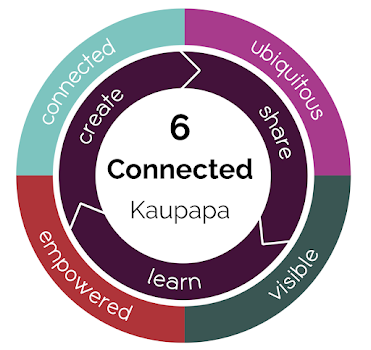
Manaiakalani pedagogy aligns with the NZ Curriculum in the firm belief that students must be given opportunities to develop 'capabilities for growing, working and participating in their communities.' Students need to feel comfortable in the digital world because this the future. They can not be empowered unless they have agency/choice in their learning and are able to create their own digital footprint in a digital world - VISIBLITY They will not be empowered until they can learn globally, at anytime, anywhere - UBIQUITY. Student learning will not be visible or ubiquitous unless they are CONNECTED and are able to share and collaborate.
Manaiakalani pedagogy aims to empower students, their whanau and teachers through digital technology capability. Digital technology should NOT be understood as just a tool but instead as the means to empower our lives. Class sites and Blogs therefore need to be visible and accessible to whanau which will support families to be more connected to schools and to discuss and understand the learning of their children. 

How has the Manaiakalani kaupapa EMPOWERED you professionally with your teaching practice?

Today in the beautiful setting at the Waitangi Museum we had the opportunity to develop our understanding of  Hangarau Matihiko, the new Digital Technologies Curriculum which has two strands:
1. Computational Thinking for Digital Technologies
2. Designing and Developing Digital Outcomes

Monika and Kerry from the Raranga Matihiko programme gave us the wonderful opportunity to inquire into computational thinking and design by experimenting with a variety of amazing resources. 

I had fun discovering with Esther Dickenson as we created the following video using the 'Green Screen', and adding photos to the background. Our 'bloopers' were not arranging/inserting objects in the right order and that is why the whare, which should have been in the foreground, is imposed on the photo of trees and sky in the background. The outcome is still pretty cool.  What a great activity for using and developing the imagination and creativity. I would love to set up a 'Green Screen' booth or corner in the play room next year.

How has the Manaiakalani kaupapa EMPOWERED  you with new skills to use with your learners?  

Computational Thinking is a task broken down into little parts i.e. coding. Decomposition skills can be taught/practised without devices. This is coding 'unplugged' which I loved the idea of and can see this working really well in the junior classroom to develop computational skills, thinking and the key directional vocabulary in a collaborative and fun way. The coding app/programme 'SCRATCH' developed by Mitchel Resnick provides printable coding tiles to be used in this way. I will certainly take advantage of this. I've also ordered his book 'Lifelong Kindergarten - Cultivating Creativity' to help give some inspiration as I work towards establishing play-based learning at our school. Blending the 'Manaiakalani' and 'Learning through Play' pedagogies will be my focus.

How has the Manaiakalani kaupapa EMPOWERED  you personally?                    

My learning today has given me a clearer perspective of the Manaiakalani kaupapa and the necessity of preparing our students for the future. This pedagogy links to The Digital Technologies Curriculum perfectly.  Both have their roots in creativity and diversity, teaching and using the skills that will be required for productivity and input to better our communities and personal wellbeing and accomplishments.
Computational thinking can be applied to any activity [waiata ringa ringa; poi, rakau, tukutuku panels]. It is about applying rules, patterning and relationships, and can be intergrated into any classroom focus to make the learning authentic. Good pedagogy dictates that we do this anyway. It is the scaffolding that gives structure and embeds the learning.  . 

Sunday, September 9, 2018

Digital Fluency Week 7


What did I learn that increased my understanding of Manaiakalani kaupapa and pedagogy?

Today's focus was 'Being Connected.' Being connected empowers students. It takes their learning beyond themselves Being connected online means 'being visible' and involves being connected to whanau, to other schools, the local community, the nation and the wider world.

Manaikalani currently has 22,000 learners in it's network who are connected by a shared language and pedagogy. The programme design focuses on a different aspect of the Manaiakalani pedagogy each term. 
Term 1: Learn - setting up systems   Term 2: Create   Term 3: Share   Term 4: Learn, Create, Share 

Programme Design
A school's kaupapa, the year level of students and the teacher may influence this guideline but across the network each school will focus on the same design aspect

What did I learn that will increase my confidence, capability or work flow as a professional?

Being connected empowers teachers. Clarelle Carruthers encouraged us to take opportunities to learn from others i.e. 'Toolbox' sessions where we can discuss ideas, share and learn from each other. This can be done by developing a cluster website, a Twitter feed [students don't twitter], link to Twitter feeds from other Manaiakalani clusters and the Tuhi Mai Tuhi Atu Blog which connects to other classes.

I also came away from today's session feeling a lot more confident that I will be able to have visible, connected learning in my own classroom. I changed and earlier attempt at a class site applying the tips from Clarelle and Kerry about colour schemes and targeting the main users [my students]. I am so much happier with the look now. We also gave feedback via a Goggle Form to others on their website designs. I gathered tips from all of the sites and was so impressed with what my colleagues have designed and implemented.

What did I learn that I could use with my learners?
I have started designing Google Slides and projects using 'Explain Everything' for 'Letter Sounds' and 'Handwriting.' I intend to get this up and running and iron out any wrinkles before attempting another curriculum area. So the letter Zz project looks like this. I have not got everything up and connected yet but am happy that I am out of the starter blocks. The Zebra will connect to the letter z in the Letter Land programme which we have not purchased for the iPads yet. The E button will take students to letter-sound and handwriting activities. In EE I used the recording tool to say the W.A.L.T, the letter-sound, and word associated with pictures. This is a great tool to use for New Entrants that can't read. It was very easy to use.


What did I learn that could improve my confidence, capability and workflow in my personal life?

I know that I have the responsibility to introduce the use of Explain Everything to the other Junior Class teachers at my school. I need to be confident in the use of it myself. I've started the journey and have a plan. I have designed a site that will be used by both classes in our syndicate. I am confident that step-by-step, with time, experimenting, calling on help from the experts and having a bank of appropriate learning resources, digital learning will give me more time in my personal life.


Standards for the Teaching Profession

STP1
Te Tiriti o Waitangi Partnership
STP2
Professional Learning
STP3
Professional Relationships
STP4
Learning-focused Culture
STP5
Design for Learning
STP6
Teaching


Wednesday, September 5, 2018

Digital Fluency Week 6


 Manaiakalani Cyversmart

What did I learn that increased my understanding of Manaiakalani kaupapa and pedagogy?

Being Cybersmart was the initial focus for the day. A Cybersmart Curriculum supports the Manaikalani pedagogy. It needs to be specifically taught and revisited to enable students to be safe on on the internet. 
The categories are: Smart Learners, Smart Footprint and Smart Relationships, which link to the Learn, Create, Share philosophy of Manaiakalani.


Being Cybersmart empowers our learners as connected citizens. When their learning is visible and accessible, anytime, any place, at any pace, our young people learn to make smart decisions and understand that every time  they connect, collaborate and share online it combines to create their digital footprint.

Cybersmart clarity: Each component in the table above is broken down into key indicators. 

What did I learn that will increase my confidence, capability or work flow as a professional?

The focus today on Explain Everything for iPads was presented by Khismara Lal from Pt England school. Her extensive knowledge at using this app for 'Learn, Create, Share' for Yrs1-3 was obvious and I now have a clearer picture of how EE is used by the teacher and students. Her slide presentation is a helpful  introduction to using ipads in a junior class.


I will be referring back to this during the next months. Students access the class site on their ipads, click on the visible learning area buttons to access  their learning for the day. Further buttons lead the students to learning activities for the day/week. They use the different features of  EE to complete these activities. Here is the link to Khasmira's Class Site. Actually visiting the site and following the links helped me to see how my class site could function. I think once it is set up and streamlined to fit each group/individual, EE will make preparing for learning and teaching less time consuming and more manageable. Learning will be visible to students and activity instructions clearly explained within each project. EE has an easy voice recording system which can be used when setting up projects [perfect for New Entrants], and by the students to complete activities. There are lots of resources that other Manaiakalani teachers have created and shared. I will look at these once I can access them through an ipad as 'Explain Everything Reader is only available on Mac devices. Next step: to get New Era to make my google account accessible on one of the new ipads which I will keep for myself. I will also ask for a mac laptop from Tela next time I am eligible for a replacement. This should make the whole planing/creating/filing and sharing process more maneagable. 
My goals are: 

  1. create my class site
  2. learn how to create learning projects in EE
  3. learn what parts of a project is created in google slides and what is created in EE
  4. set up all iPads  the same - icons in the same folders, lock screen
  5. set up indivdual students' Google Accounts
  6. sign all iPads into individual learners’ Google Accounts (Google Drive, Chrome & Explain Everything)
  7. label iPads on the outside with learners’ name [will have to be inventive because adhesive stickers/tape etc won't stick]
  8. label individual Styluses with learner's names [styluses have been ordered]
Explain Everything downloads link


What did I learn that I could use with my learners?
I will need to continue using a structured approach to the 'Kawa of Care' of the ipad and using the various features of Explain Everything. This will involve the use of a stylus which we don't yet posses and also accessing the class website which is still in the design process.

What did I learn that could improve my confidence, capability and workflow in my personal life?

Knowing that I can access already completed resources rather than starting from scratch is a bonus that will be such a time saver. Working collaboratively and sharing resources within our school, Ka hui ako and wider afield will help strengthen networking and our profession. Working collaboratively within our local area will mean growing a bank of resources that are the authentic to our students. Having accessibility to a range of existing resources will also give me ideas for creating my own.